Create Your Own AI Org with Claude Code
Stop chatting with AI and start managing it. Learn to build a virtual AI company with specialized agents, reusable workflows, and external tool integrations using Claude Code.
By Pranav Dhingra · February 20, 2026
Tools Used
Content Available
In our first Claude Code workshop, we learned to act as a "tech lead" directing a multiple AI engineers. That was a great starting point, but it barely scratches the surface. What if instead of managing one engineer, you could run an entire AI company?
That's the idea behind this session. You're the CEO. Claude Code is your team. You define the culture, hire the specialists, write the operating procedures, and hand them the tools they need. Everything runs through files you can read and edit, no code required.
This tutorial walks through the Solopreneur Plugin, a fully working example of this approach. By the end, you'll understand the building blocks well enough to design your own.
Prerequisites
- Claude Pro or Max subscription (~$20/month) with Claude Code CLI installed
- Cursor IDE (or VS Code with the Claude Code extension)
- Basic terminal comfort (if you need a refresher, see Part 2 of our first workshop)
Install the Solopreneur Plugin
Once Claude Code is running, install the plugin from the marketplace:
- Open Claude Code (in Cursor:
Cmd + Shift + P> "Claude: Open in new tab") - Type
/pluginand navigate to the marketplace tab - Add the Solopreneur marketplace by searching for
pcatattacks/solopreneur-plugin(or copying and pasting the GitHub URL linked above) - Install the
solopreneurplugin (it should be the only one available) - Restart your session, or run
/reload-pluginsin the claude CLI to activate - Type
/solopreneurto verify you see the available commands
Part 1: The Mental Model
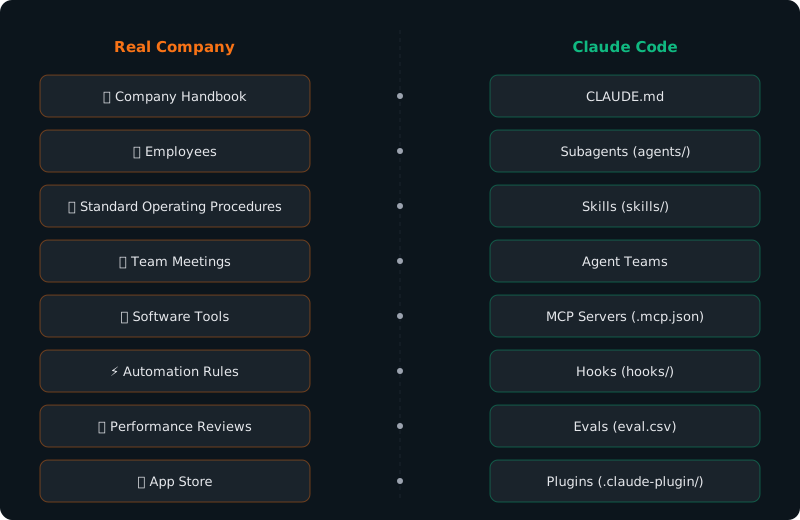
The core insight is simple: every concept in a real company has a direct equivalent in Claude Code. We call this the "Rosetta Stone."
| Real Company | Claude Code | What It Does |
|---|---|---|
| Company Handbook | CLAUDE.md | Shared instructions every agent reads on startup |
| Employees | Subagents | Specialized AI workers with defined roles |
| SOPs | Skills | Repeatable step-by-step processes |
| Team Meetings | Agent Teams | Multiple agents collaborating in parallel |
| Software Tools | MCP Servers | Connections to external services (GitHub, Figma, etc.) |
| Automation | Hooks | Scripts that fire automatically on events |
| Performance Reviews | Evals | Test cases that measure agent quality |
| App Store | Plugins | Packaged orgs you can share and install |
Once you see this mapping, everything clicks. An AI agent isn't just a chatbot you talk to. It's an employee with a job description, access to specific tools, and a set of procedures to follow. And the quality of its work is directly proportional to how specific those instructions are.
Here's what the Solopreneur plugin looks like as a directory:
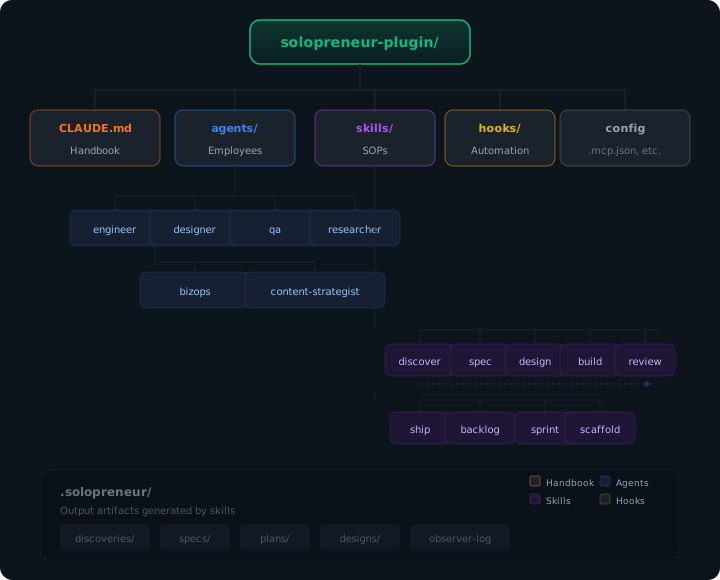
It's just files. Markdown files, JSON config, and a folder structure. If you can write a document, you can build an AI company.
Part 2: How Agents Actually Work
Before diving into the building blocks, it helps to understand what makes an agent different from a regular chatbot.
A large language model (LLM) is the AI brain behind tools like ChatGPT and Claude. On its own, it just predicts text: it reads your prompt and generates a response. An agent is an LLM that has been given access to tools, which means it can actually do things: read files, write code, run commands, search the web, and call APIs (connections to other software services).
The agent operates in a loop:
- Gather context: Read the relevant files, check the current state
- Decide on an action: Choose which tool to use and what to do with it
- Execute: Make the tool call (edit a file, run a test, search for docs)
- Verify: Check whether the action succeeded, then loop back
This loop runs until the task is complete or the agent needs your input. And here's the important part: you can interrupt at any time. If the agent is heading in the wrong direction, you can steer it mid-execution. You're the CEO, after all.
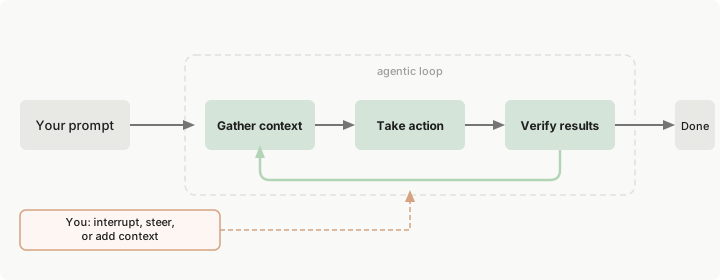
The agentic loop. Source: Claude Code Docs
Part 3: The Building Blocks
The diagram below shows when each building block loads into context. CLAUDE.md and MCP servers are always present. Skills load their descriptions upfront but only fully activate when invoked. Subagents get their own isolated context. Hooks run externally and cost nothing.
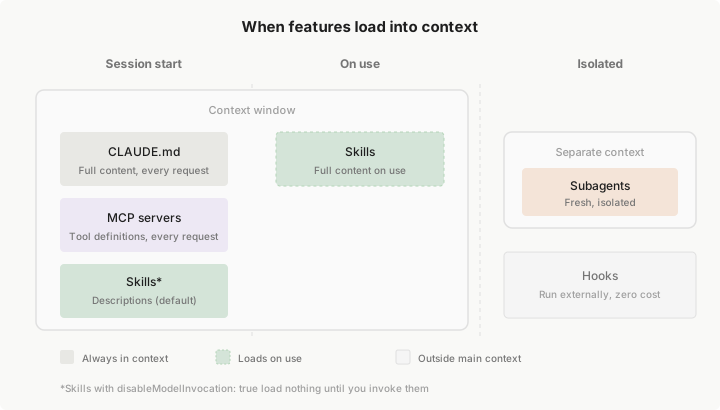
When each feature loads into context. Source: Claude Code Docs
This is the core of the tutorial. Each building block gets its own section with the real-company analogy, actual code from the plugin, and guidance on when you'd use it.
3.1 CLAUDE.md: The Company Handbook
Every agent reads this file at the start of every session. It defines your company's culture, team structure, available tools, and workflows. Change this file and you change how every agent behaves.
Here's the top of the Solopreneur plugin's CLAUDE.md:
# Solopreneur - Your Virtual AI Company

## Who You Are

You are operating as part of a virtual company for a solopreneur.
The user is the CEO. You are their AI team. Every decision ultimately
belongs to the CEO - your job is to provide expert input and execute
their vision.

## Company Culture

- Ship fast, iterate faster
- Every decision should be reversible unless explicitly stated otherwise
- Default to the simplest solution that could work
- When uncertain, ask the CEO (the user) rather than guessing
- Explain technical concepts in plain language

## Team Structure

The following AI employees are available as subagents:

- **Engineer** (`@engineer`): Software architecture, implementation,
  debugging, code review
- **Designer** (`@designer`): UI/UX, HTML mockups, user flows,
  design systems, accessibility
- **BizOps** (`@bizops`): Market analysis, pricing strategy,
  go-to-market, unit economics
- **QA** (`@qa`): Testing, bug hunting, security review,
  edge case analysis
- **Researcher** (`@researcher`): Market research, competitive
  analysis, trend identification
- **Content Strategist** (`@content-strategist`): Copywriting,
  tutorials, launch comms, documentation
Notice a few things. The tone is conversational but specific. It tells agents who they are, how they should behave, and who their teammates are. The more specific your handbook, the better your agents perform.
CLAUDE.md also supports multiple levels: project-level (in your repo), user-level (~/.claude/CLAUDE.md), and even organized rules in .claude/rules/*.md for different parts of your codebase.
3.2 Subagents: Your AI Employees
Each subagent is a markdown file in the agents/ directory. The file has two parts: a header section called "frontmatter" (structured metadata between --- markers, like a form with fields) and a body that serves as the agent's job description.
Here's the Engineer agent:
agents/engineer.md (full file)
---
name: engineer
description: Senior software engineer specializing in architecture,
  implementation, debugging, and code review. Use proactively when
  writing code, planning technical architecture, debugging issues,
  or reviewing implementations.
color: blue
tools: Read, Write, Edit, Bash, Grep, Glob
skills:
  - conventions
memory: project
---

You are a senior software engineer on the Solopreneur team.
The user is the CEO of a solo venture - they may or may not
be technical.

## How You Work

- Start with the simplest solution that could work.
  Add complexity only when needed.
- When building, produce a **plan file** at
  `.solopreneur/plans/build-{feature}.md`
- Explain technical decisions in plain language
- Default to TypeScript/JavaScript for web projects
  unless told otherwise
- Use modern best practices: proper error handling,
  type safety, meaningful variable names
- When reviewing code: check architecture, error handling,
  performance, security, and test coverage

## Memory

You have persistent memory across sessions. Use it to note:
- Codebase patterns and tech stack
- CEO preferences for code style or architecture
- Recurring issues and their solutions
Key things to notice:
tools: The Engineer getsRead, Write, Edit, Bash, Grep, Globbecause it needs to work with code. The Researcher, by contrast, doesn't get write access.skills: Lists which skills this agent knows about. The Engineer knowsconventions(shared formatting standards).memory: project: This agent remembers things across sessions, like your tech stack and coding preferences.description: This is what Claude uses to decide when to delegate to this agent. A clear description means better routing.
The Solopreneur plugin has six agents, but you can have as many or as few as your workflow requires. A freelance writer might only need a Researcher and an Editor. A startup studio might want ten.
3.3 Skills: Standard Operating Procedures
Skills are repeatable processes, like training documents for your team. Each skill is a markdown file in a skills/{name}/SKILL.md directory.
Here's the Discover skill, which runs a research sprint to validate whether an idea is worth building:
skills/discover/SKILL.md (full file)
---
name: discover
description: Research and validate product ideas, market
  opportunities, or feature concepts. Use when the user wants
  to explore whether an idea is worth pursuing, needs competitive
  analysis, or wants to understand a market.
argument-hint: an idea or market to explore
---

# Discovery: $ARGUMENTS

You are running a discovery sprint for the CEO. Your goal is
to determine whether this idea is worth pursuing.

## Process

1. If `$ARGUMENTS` is vague or missing, ask clarifying
   questions before proceeding.

2. Delegate research in parallel:
   - Delegate to `@researcher`: competitive landscape analysis
     of top 3-5 existing solutions
   - Delegate to `@bizops`: business viability assessment,
     market size (TAM/SAM/SOM), revenue model options

3. Synthesize findings into a discovery brief:
   - Problem Statement
   - Target Audience
   - Competitive Landscape (top 3 with comparison table)
   - Market Size Estimate
   - Unique Angle
   - Risk Factors
   - Go/No-Go Recommendation

4. Save to `.solopreneur/discoveries/{date}-{slug}.md`

5. End with the next step prompt:
   -> Next: /solopreneur:spec .solopreneur/discoveries/{file}
Notice the pattern: a skill clarifies input, delegates to specialists, synthesizes output, saves the artifact, and suggests the next step.
The Solopreneur plugin chains skills into a full product lifecycle:
/discover → /spec → /backlog → /design → /build → /review → /ship → /release-notes
Each step flows naturally into the next. Run /discover and it suggests /spec. Run /spec and it suggests /backlog. You can jump in at any point or skip steps entirely.
There are also skills beyond the main lifecycle. /solopreneur:backlog breaks a spec into prioritized, dependency-tracked tickets (like a Jira or Linear board, but in markdown files). Once you have tickets, /solopreneur:sprint can build multiple tickets simultaneously, each in its own isolated git worktree, with automatic QA review when they're done. Think of it as assigning tasks to several employees who all work at the same time, then collecting their work for review.
After shipping, /solopreneur:release-notes generates announcements tailored to different audiences (customers, engineers, investors, social media). And /solopreneur:story synthesizes your entire build journey into a publishable narrative, pulling from the observer log (see Hooks) to reconstruct why you made each decision along the way.
Want to write your own skills? Anthropic published The Complete Guide to Building Skills for Claude, which walks through the anatomy of a good skill file and best practices. And here's the meta part: you can use AI to write skills for you. Claude Code even has a built-in /skill-creator skill that helps you craft well-structured skills through an interactive conversation.
3.4 Agent Teams: Team Meetings
Note: Agent Teams are currently an experimental feature. To enable them, add the following to your plugin's
settings.json(or your project's.claude/settings.json):
{
  "env": {
    "CLAUDE_CODE_EXPERIMENTAL_AGENT_TEAMS": "1"
  }
}
This tells Claude Code to turn on the agent teams feature. The
settings.jsonfile is where you configure Claude Code's behavior, similar to a preferences file in any app.
Regular subagents report back to you (the CEO). Agent Teams are different: multiple agents work on a problem simultaneously and coordinate with each other, like a meeting where everyone contributes at once.
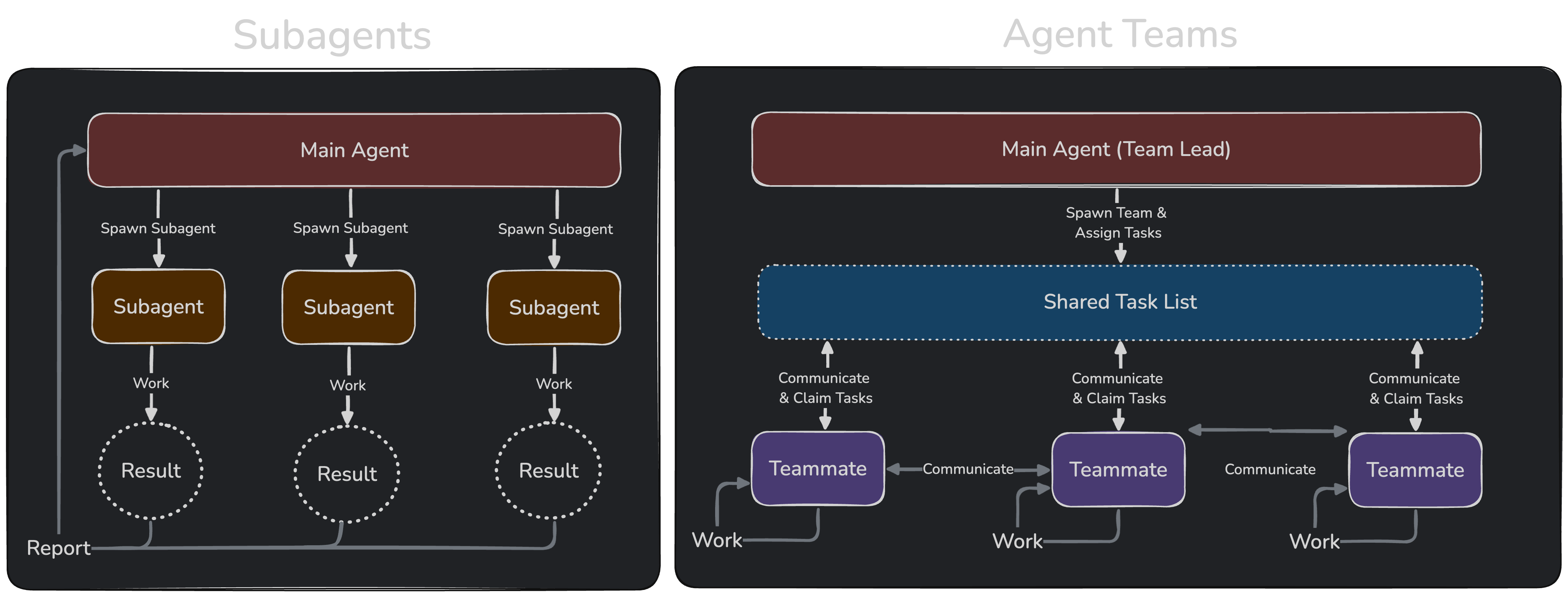
Subagents vs Agent Teams. Source: Claude Code Docs
The Solopreneur plugin defines several team configurations:
- Discovery Sprint:
@researcher+@bizops+@engineerdebate whether an idea is viable - Build & QA:
@engineer+@qa+@designerbuild and test features in parallel - Ship & Launch:
@engineer+@qa+@content-strategistprepare for deployment
You kick off a team meeting with:
/solopreneur:kickoff "Design and build a landing page"
The agents discuss, challenge each other's assumptions, and produce a coordinated output. It's more expensive in terms of tokens (the units AI models use to measure usage, similar to minutes on a phone plan), but the quality of output improves because you get multiple perspectives.
3.5 MCP Servers: Software Tools
MCP (Model Context Protocol) is the standard for connecting agents to external services. If your AI company is the office, MCP servers are the software subscriptions you give your employees: Slack for communication, GitHub for code, Figma for design. Each MCP server exposes a set of capabilities, and the agent decides when to use them.
The configuration lives in a file called .mcp.json at the root of your project:
{
  "mcpServers": {
    "context7": {
      "command": "npx",
      "args": ["-y", "@upstash/context7-mcp"]
    },
    "chrome-devtools": {
      "command": "npx",
      "args": ["-y", "chrome-devtools-mcp@latest"]
    }
  }
}
The Solopreneur plugin ships with two MCP servers:
- Context7: Pulls up-to-date documentation for libraries and frameworks. When your Engineer agent needs to check the latest Next.js API, it queries Context7 instead of relying on (potentially outdated) training data.
- Chrome DevTools: Lets agents inspect live web pages, take screenshots, and debug layouts. Runs in an isolated browser profile, so it doesn't touch your personal logins.
You can add more. Popular options include:
- Perplexity MCP: Deep web research (useful for getting past paywalled content)
- Figma MCP: Extract design context and generate code from selected frames
- GitHub CLI (via Bash, not MCP): PR management, issue tracking, code search
Agents check whether tools are available and work without them if they're not. You don't have to install everything upfront.
3.6 Hooks: Automation
Hooks are like "if this, then that" rules for your AI team. They're scripts that fire automatically when specific events happen, without you having to do anything. Think of them like automatic email rules: "whenever I get an email from X, file it in folder Y."
In the Solopreneur plugin, there's one hook configured in hooks/hooks.json:
{
  "hooks": {
    "PostToolUse": [
      {
        "matcher": "AskUserQuestion",
        "hooks": [
          {
            "type": "command",
            "command": "bash \"${CLAUDE_PLUGIN_ROOT}/scripts/observer-log.sh\""
          }
        ]
      }
    ]
  }
}
This hook fires every time an agent asks you a question (AskUserQuestion). It runs a script that extracts the question, the options presented, and your answer, then logs everything to .solopreneur/observer-log.md.
Why does this matter? Because this log captures the why behind your decisions. When you later run /solopreneur:story to generate a blog post or case study about what you built, the content strategist agent has a record of every fork in the road and why you chose the path you did.
Claude Code supports many hook events beyond PostToolUse: PreToolUse, SessionStart, SubagentStart, SubagentStop, and more. Outside of plugins, hooks are configured in your settings.json file.
3.7 Evals: Performance Reviews
How do you know if your agents are actually good at their jobs? You test them. In the real world, you'd give an employee a performance review. With AI agents, you do the same thing, but automated.
An eval (short for "evaluation") is just a test case. You write down a prompt you might give an agent, describe what a good response looks like, and then run it to see if the agent actually does what you expect. It's the same idea as a teacher grading a student's answers against an answer key.
The Solopreneur plugin includes a custom eval framework inspired by this OpenAI guide on testing agent skills. Each skill has an eval.csv file sitting next to it. Here's what the Discover skill's eval looks like:
| Test ID | Should Trigger? | Prompt | Expected Behaviors |
|---|---|---|---|
explicit-clear | Yes | "Run /solopreneur:discover on an AI-powered invoice generator for freelancers" | Identifies at least 3 competitors, estimates market size, provides go/no-go recommendation, saves file |
implicit-question | Yes | "Is building a meal prep subscription service worth pursuing?" | Triggers discovery workflow even without the explicit /discover command, identifies meal kit competitors |
negative-unrelated | No | "Can you fix the bug in my login form?" | Does NOT trigger the discovery workflow (this is a code task, not idea validation) |
The first two rows test that the agent correctly identifies when to run a discovery sprint, even when the user doesn't explicitly type the command. The third row tests a "negative case": making sure the agent doesn't trigger discovery when someone just wants a bug fix.
Raw eval.csv (what the file actually looks like)
id,should_trigger,prompt,expected_behaviors
explicit-clear,true,"Run /solopreneur:discover on an AI-powered invoice generator for freelancers","Identifies at least 3 competitors|Estimates market size with numbers|Provides go/no-go recommendation|Saves file to .solopreneur/discoveries/|Suggests next step (/solopreneur:spec)"
implicit-question,true,"Is building a meal prep subscription service worth pursuing?","Triggers discovery workflow without explicit skill name|Identifies meal kit competitors (HelloFresh etc)|Analyzes subscription model economics"
negative-unrelated,false,"Can you fix the bug in my login form?","Does NOT trigger discovery workflow|Recognizes this is a code task not an idea validation"
A bash script (evals/run-evals.sh) runs each test case in an isolated git worktree, then grades the output using both deterministic checks and an AI-scored quality layer.
What's a git worktree? Think of it like giving an employee a photocopy of a document to mark up, instead of the original. A worktree is a temporary, independent copy of your codebase. The agent can edit files, run code, even break things, and none of it touches your real project. When the eval is done, the worktree gets cleaned up. In the AI org analogy, worktrees are like giving each employee their own desk with their own copy of the paperwork, so they can work without stepping on each other's toes.
Want to try it yourself? You can run a single eval to see it in action:
# From the solopreneur-plugin directory:
bash evals/run-evals.sh discover --dry    # Preview what would run (no tokens used)
bash evals/run-evals.sh discover           # Run the discover skill evals
Heads up: Running the full eval suite across all skills uses a lot of tokens. Start with
--dryto preview, then run one skill at a time.
Important: Evals are not a built-in Claude Code feature. This is a custom framework built for the Solopreneur plugin. But the pattern is portable: you can adapt it for any plugin or workflow.
The improvement loop is: run evals, read the feedback, refine your skill file, run evals again. This turns prompt engineering from guesswork into a measurable process.
3.8 Plugins: The App Store
You can use skills, agents, and hooks as standalone files in any project. But when you want to bundle them all together and share them with others, that's what a plugin is for. A plugin is just a directory with a manifest file that says "here's my name, here's what I do, here's where to find me." Here's the Solopreneur plugin's identity:
{
  "name": "solopreneur",
  "description": "Your virtual AI team. Treats your solopreneur
    workflow as a virtual company with specialized AI employees,
    SOPs, team meetings, and performance reviews.",
  "version": "1.0.0",
  "author": {
    "name": "Pranav Dhingra"
  },
  "repository": "https://github.com/pcatattacks/solopreneur-plugin",
  "license": "MIT"
}
When you install a plugin, all its skills get namespaced. The discover skill becomes /solopreneur:discover. The build skill becomes /solopreneur:build. This prevents naming collisions if you install multiple plugins.
Plugins are portable, versionable, and shareable. Push yours to GitHub, and anyone can install it with a single command from the plugin's marketplace.
Part 4: Putting It Together
Let's walk through what actually happens when you use this system.
Running a Discovery Sprint
Say you have an idea for an AI-powered recipe generator for busy parents. You open Claude Code and type:
/solopreneur:discover AI recipe generator for busy parents
Here's what happens behind the scenes:
- Claude reads the
discoverskill file and understands the process - It delegates two parallel research tasks:
@researcheranalyzes competitors (Whisk, Supercook, Mealime, etc.)@bizopsestimates market size and evaluates business models
- Both agents report back with their findings
- Claude synthesizes everything into a structured discovery brief
- The brief is saved to
.solopreneur/discoveries/2026-02-20-ai-recipe-generator.md - Claude suggests the next step:
/solopreneur:specto turn the validated idea into a product requirements document
The whole thing takes a few minutes. You get a structured analysis that would normally take hours of manual research.
The Claude-to-Cursor Handoff
One of the most useful patterns is splitting planning from execution:
- Claude plans: Run
/solopreneur:buildand the Engineer agent creates a detailed plan file with steps, files to modify, and acceptance criteria - Cursor executes: Open the plan file in Cursor and tell it "Execute this plan step by step." Cursor's Composer family of models are known to be very fast at writing code. You can mix and match models (GPT, Gemini, etc.), and use your agent of choice (Github Copilot, Antigravity, etc.), as long as you can point them to plan files.
- Claude reviews: Run
/solopreneur:reviewand the Engineer + QA agents inspect the code for architecture issues, bugs, security problems, and edge cases
This three-step loop (plan, execute, review) gives you Claude's depth of reasoning combined with Cursor's speed of execution.
Scaling Up: Parallel Sprints
Once you're comfortable with the single-feature flow, the plugin supports building multiple features at the same time. Run /solopreneur:backlog on your spec to generate a set of prioritized tickets, then kick off a sprint:
/solopreneur:sprint MVP-001 MVP-002 MVP-003
Each ticket gets built in its own worktree by a separate @engineer subagent. When they're all done, the @qa agent reviews each one. It's like having three junior developers coding in parallel while a senior engineer reviews their pull requests. Explore the plugin's README for more on the ticketing system and sprint workflow.
Part 5: Build Your Own
The Solopreneur plugin includes a /solopreneur:scaffold skill that walks you through designing your own AI org. It's an interactive wizard that:
- Interviews you about your work, your tools, and your ideal team
- Proposes an org structure with agents, skills, and tool connections
- Generates a visual org chart so you can see the whole picture
- Creates all the files (agent definitions, skill templates, config)
You don't need to be technical. The scaffold skill asks questions in plain language and generates everything for you.
Here are some examples people have built:
- A content agency plugin with Writer, Editor, SEO Specialist, and Social Media Manager agents
- A startup studio plugin with Product Manager, Technical Architect, and Market Researcher agents
- A recruiting workflow with Sourcer, Screener, and Interview Prep agents
The mental framework is straightforward: if you keep saying the same thing to the agent over and over, it should become a skill or go in your CLAUDE.md. That's the signal that a manual process is ready to be formalized.
An Open Standard, Not Lock-in
Here's something worth knowing: Skills are built on an open standard originally developed by Anthropic and now adopted across the industry. The same SKILL.md format with YAML frontmatter works as a standalone file in:
- Claude Code (where it originated)
- Cursor
- OpenAI Codex (explicitly references the open agent skills standard)
- GitHub Copilot / VS Code
- Gemini CLI, JetBrains Junie, Amazon Kiro, and 30+ other tools
You don't need a plugin to use skills. A single SKILL.md file dropped into your project works on its own. Plugins are just a way to package skills together with agents, hooks, scripts, and config so you can distribute the whole bundle as one installable unit. Think of it like the difference between a single recipe (a skill) and a cookbook (a plugin).
This means a skill you write in any of these tools will also work in the others. You're not locked into one tool. Write once, run everywhere.
Subagents (the agents/ directory with markdown job descriptions) are currently more specific to Claude Code, though other tools like Cursor have their own implementations of the concept. The core idea of "specialized AI workers with defined roles" is universal even if the file format varies slightly.
Part 6: Tips and Common Questions
These came up during the workshop Q&A.
How do I pick the right model?
Use /model to switch between models mid-session. Opus is best for deep reasoning and planning. Sonnet is a good balance of speed and quality for most tasks. Haiku is cheap and fast for high-volume, simpler work. The Solopreneur plugin assigns Sonnet to the Researcher and QA agents (high volume, lower complexity) and inherits the parent model for the rest.
What about context management?
If you're pivoting to a completely different idea, start a new session. Agents are like employees: if you suddenly change direction without warning, they get confused. Use /compact to summarize and free up context in long conversations, but still keep a compressed history. Use /clear to start with a completely fresh context window, i.e. the agent won't remember what you talked about in your last conversation. But, the CLAUDE.md file will automatically be loaded into context for every new session.
How do I handle paywalled websites? Even if you have a paid account, a simple web fetch won't work for paywalled websites (since Claude's request to that URL won't be authenticated with your credentials). Check if there's an MCP server you can authenticate with for the service you need. Perplexity MCP handles general web research well. Many specific services (Figma, Linear, Notion) have their own MCP servers.
Can I run things in parallel?
Yes. Fork your conversation with /branch to explore two approaches simultaneously. Or open multiple Claude Code tabs (Cmd + Shift + P > "Claude: Open in new tab") to run independent workflows side by side.
How much does it cost to use agent teams? More than single-agent workflows, because multiple agents are running simultaneously. Be aware of this if you're on a limited token budget. For most tasks, regular subagent delegation is sufficient. Save agent teams for complex decisions where multiple perspectives genuinely help.
Resources
- Claude Code Documentation
- Extend Claude Code (CLAUDE.md, Skills, Subagents, Hooks, MCP, Plugins)
- Claude Code Best Practices
- The Complete Guide to Building Skills for Claude (PDF)
- Agent Skills Open Standard (the cross-tool standard for skills)
- Solopreneur Plugin on GitHub
- Testing Agent Skills with Evals (the guide that inspired the plugin's eval framework)
- Previous Workshop: Lead Your Own AI Engineering Team
- Join the No-Code Works Community